• Which the release of FS2020 we see an explosition of activity on the forun and of course we are very happy to see this. But having all questions about FS2020 in one forum becomes a bit messy. So therefore we would like to ask you all to use the following guidelines when posting your questions:

    • Tag FS2020 specific questions with the MSFS2020 tag.
    • Questions about making 3D assets can be posted in the 3D asset design forum. Either post them in the subforum of the modelling tool you use or in the general forum if they are general.
    • Questions about aircraft design can be posted in the Aircraft design forum
    • Questions about airport design can be posted in the FS2020 airport design forum. Once airport development tools have been updated for FS2020 you can post tool speciifc questions in the subforums of those tools as well of course.
    • Questions about terrain design can be posted in the FS2020 terrain design forum.
    • Questions about SimConnect can be posted in the SimConnect forum.

    Any other question that is not specific to an aspect of development or tool can be posted in the General chat forum.

    By following these guidelines we make sure that the forums remain easy to read for everybody and also that the right people can find your post to answer it.

Runway markings not showing properly in sim

Messages
5
Country
india
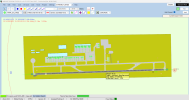
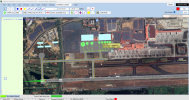
Hi, i was updating a stock p3d airport to make it uptodate. but the runway numbers are not showing correctly in the sim. The runway is 27-09. It is correctly showing in ADE

 

Attachments

  • image.webp
    image.webp
    623.6 KB · Views: 135
  • image (1).webp
    image (1).webp
    686.5 KB · Views: 127
  • Screenshot 2025-07-25 224043.png
    Screenshot 2025-07-25 224043.png
    2.3 MB · Views: 143
  • Screenshot 2025-07-25 224111.png
    Screenshot 2025-07-25 224111.png
    2.7 MB · Views: 163
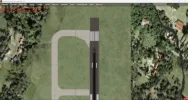
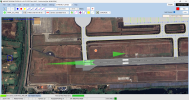
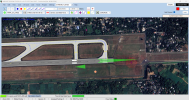
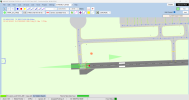
I assume the default rwy screenshots are the 2 on the left above and the 2 on the right are ADE along with a satellite image as background??
What you are seeing is a combination of uneven terrain that comes with the background image where as your ADE version is not the same terrain variation so what is on the attached image is what I call "bleed thru".
If you are going to attach a satellite image that contains a runway and you are wanting to "add" your own runway over the top, any terrain changes have to be configured into ADE. The other option is to add with ADE a "flattened" background that EXACTLY matches the same runway points on the globe and then ADD your own ADE runway within the flattened area. This issue does not come into play with taxiways or paths as they are not a "precise" entity.

To prove this, as I have gone thru similar, remove the background satellite image and add your "updates" to the stock runway, along with all comms, etc.
 
I assume the default rwy screenshots are the 2 on the left above and the 2 on the right are ADE along with a satellite image as background??
What you are seeing is a combination of uneven terrain that comes with the background image where as your ADE version is not the same terrain variation so what is on the attached image is what I call "bleed thru".
If you are going to attach a satellite image that contains a runway and you are wanting to "add" your own runway over the top, any terrain changes have to be configured into ADE. The other option is to add with ADE a "flattened" background that EXACTLY matches the same runway points on the globe and then ADD your own ADE runway within the flattened area. This issue does not come into play with taxiways or paths as they are not a "precise" entity.

To prove this, as I have gone thru similar, remove the background satellite image and add your "updates" to the stock runway, along with all comms, etc.
like you said i tried removing the background satellite image and made the changes, but the issue did not fix. I also tried flattened the surface using the polygon tool at the exact points of the runway but it is not fixed. I will also attach the ADE file if you would like to take a look. :)
 

Attachments

  • today 2.png
    today 2.png
    1.8 MB · Views: 112
  • today.png
    today.png
    284.6 KB · Views: 115
  • VOCI_ADE - Copy.ad4
    VOCI_ADE - Copy.ad4
    48.4 KB · Views: 109
OK, there are a significant number of incorrect things in your ADE. I have looked into this with P3Dv5.4 and your ADE shows that same as it does on your v4. Thats the good news.
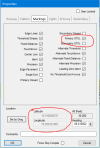
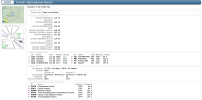
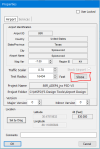
The airport that you sent to me in your ADE is far from correct. The runway 09/27 is not in the correct position or heading. It should be at Latitude 10.151112378 and Longitude 76.400508285 and heading 87.870003. The real issue is that you have marked the runway as STOL (Short Takeoff Or Landing) and this runway is 11,154 foot long (STOL runway length is 2,600 feet or shorter). Remove STOL setting via ADE (see attached) and your RWY IDs will show correctly. The reason there was overlap of number and letters on RWY 9 and not on Rwy 27 was due to you selecting STOL for the Primary but not the secondary.
If you plan to use a background image, runway and taxiways need to be in the correct position (Long/Lat). At your current placement, your RWY is in the "Lotus Pond".
Hope this helps. See attached.
 

Attachments

  • Your_ADE_Runway_Proplerties_Capture.PNG
    Your_ADE_Runway_Proplerties_Capture.PNG
    22.9 KB · Views: 110
  • VOCI_details_Capture.PNG
    VOCI_details_Capture.PNG
    336.3 KB · Views: 114
OK, there are a significant number of incorrect things in your ADE. I have looked into this with P3Dv5.4 and your ADE shows that same as it does on your v4. Thats the good news.
The airport that you sent to me in your ADE is far from correct. The runway 09/27 is not in the correct position or heading. It should be at Latitude 10.151112378 and Longitude 76.400508285 and heading 87.870003. The real issue is that you have marked the runway as STOL (Short Takeoff Or Landing) and this runway is 11,154 foot long (STOL runway length is 2,600 feet or shorter). Remove STOL setting via ADE (see attached) and your RWY IDs will show correctly. The reason there was overlap of number and letters on RWY 9 and not on Rwy 27 was due to you selecting STOL for the Primary but not the secondary.
If you plan to use a background image, runway and taxiways need to be in the correct position (Long/Lat). At your current placement, your RWY is in the "Lotus Pond".
Hope this helps. See attached.
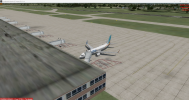
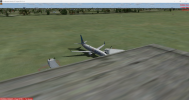
I fixed all the things you said and now the runway numbers are showing correctly. But there is another issue, the ground textures disappear when looked from some particular camera angles. When i watched a tutorial the guy said if the ground textures are not showing correctly we have to use the polygon tool and create a flattened surface, i did try that. How can i fix that? Thank you very much for your help. And for the background satellite image, aren't they just for a reference while building the airport and they don't actually compile with the scenery right? Because there weren't any background satellite imagery showing when i first compiled the airport even though the satellite image was in the ADE while compiling.
 

Attachments

  • voci 2.png
    voci 2.png
    2.2 MB · Views: 121
  • voci invis 2.png
    voci invis 2.png
    1.4 MB · Views: 120
  • voci invis.png
    voci invis.png
    1.4 MB · Views: 110
  • ade.png
    ade.png
    365.3 KB · Views: 125
Well, you have apparently changed not only the RWY location (Long/Lat) but also the physical location of the entire airport. If you position the airport in the correct location, remove the 2 overlapping airport background polys, and construct an Airport background poly "Flatten Mask Class Map Exclude Autogen Smooth, you will find the problem you stated above goes away.
I really dont understand why both the airport location and the runway location were changed. The way it currently is configured, the airport sits directly on top of a major north south multi lane highway.
I would strongly suggest that you start with the STOCK airport and then make your modifications.
 
Well, you have apparently changed not only the RWY location (Long/Lat) but also the physical location of the entire airport. If you position the airport in the correct location, remove the 2 overlapping airport background polys, and construct an Airport background poly "Flatten Mask Class Map Exclude Autogen Smooth, you will find the problem you stated above goes away.
I really dont understand why both the airport location and the runway location were changed. The way it currently is configured, the airport sits directly on top of a major north south multi lane highway.
I would strongly suggest that you start with the STOCK airport and then make your modifications.so i
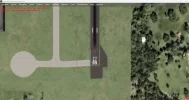
So i guess the default coordinates itself are wrong, because i didn't change any coordinates while editing the scenery. In the first attached screenshot i freshly opened the stock airport and added the background satellite image, and it looks like that. So what you said about the runway being in a 'lotus pond' and above a multi lane national highway makes sense now. Also the apron sits above the airport buildings and some solar panels in the stock scenery. I saw this problem initially and i thought i just entered the satellite image coordinates wrong and i just dragged the image to align with the stock airport :) and build it from there. I will change the coordinates to its correct ones and will try to make the scenery better, Thanks for your help.
 

Attachments

  • stock voci.png
    stock voci.png
    1.8 MB · Views: 130
  • voci 2.png
    voci 2.png
    2.4 MB · Views: 120
Hey Lemon, you happen to be answering a question I was about to post so lemmi post it here since it is on topic. Haven't used ADE in years but it is coming back to me. Modifying a default airport in P3D v5.4. It's coming along well except for (you guessed it) the ground. Getting some floating runways by a few feet.

My question is do I need to first create an exclude AB poly (in ADE or SBuilderX) to first get rid of the default airports altitude info? And then create a 2nd flatten ground poly to serve as my proper elevation? Using photo ground scenery as well but I am using default ground elevations. I think I had it almost before yet I noticed a "ripple" of terrain running in a long path. Reverting back to the default airport I could see this was the edge of the old runway outskirts (the grass texture following the runway).

If I am correct in needing to create two polys (exclude and a new flatten), can these be in one bgl or must the be separate. Maybe they even have to be in two separate scenery folders so I can give the new flatten priority? It's been awhile....

2nd question while I am at it. The default airport altitude was off. It was 33 feet and needs to be 31. So the exclude should wipe out the old 33 foot elevation while my new 31 foot flatten should override it, yes?

thank, Marcus
 
Marcus, let me try to answer based on what I have done...and prefer.
First off, "no exclusion rectangles", instead I ADD a Polygon (on ADE, its the Green symbol at the top of the ADE menu.
Dealing with terrain changes is a challenge and you will also (depending on what version of P3D and ADE you are running), deal with either "flat runways" or compile them as "sloped" and then deal with the fact that runways that are sloped, are never linear from end to end, but vary along their entire length. This becomes a significant piece of work.
As I do a lot of airport modeling and even more P3D flying, I would rather spend the time actually flying P3D and not trying to cope with uneven terrain.
Therefore, when faced with uneven terrain for runways, I simply use a "Flattened Polygon" to cover just the length and width of the runway.
As you can see in the attached, I have used and ADE Polygon to "flatten, smooth, and excluded AutoGen" for runway 88R.
You will find that if you choose to craft a runway that is sloped and you want to deal with "sloped terrain", this is enabled / disabled in the ADE Airport Properties Option. This "sloping" then applies to the entire airport property as defined in the ADE Airport properties listing.
Therefore, if I have an airport who has significant terrain elevation changes in the surrounding scenery, I simply use a polygon to flatten and smooth and if there is "autogen" objects that I dont want, select exclude Autogen, those select area (s) and leave the rest of the defined airport untouched.
I hope this helps and I did not misunderstand your question.
Take a look at the attached screen captures as well. These might help clarify my above ramblings.
 

Attachments

  • ADE_Airport Properties_Sloped.PNG
    ADE_Airport Properties_Sloped.PNG
    20.4 KB · Views: 98
  • 88R_Flattened.PNG
    88R_Flattened.PNG
    22.7 KB · Views: 105
  • ADE_Polygon_Capture.PNG
    ADE_Polygon_Capture.PNG
    15.9 KB · Views: 94
  • Runway_Flatten_Capture.PNG
    Runway_Flatten_Capture.PNG
    14.6 KB · Views: 110
Thank you Lemon, for such a quick reply. All good stuff I will dive into today. FYI - I am using P3D v5.4. I forgot that P3D introduced sloped runways. Since I have your attention let me ask a few questions which you may or may not know.

1. The airports I am working on do not need to have sloped runways. If I create a large flatten poly to cover the entire airport, will that override any sloping and just make the airport flat?
2. Should I create a flatten just for the runway(s) or create a flatten to cover the whole airport? Luckily, the airports are in Florida and the terrain is relatively flat if that makes a difference.
3. In your image you show what type of flatten to select, "Flatten Mask Class Map Exclude Autogen Smooth", do you know what that "smooth" means? Curious. Does it have something to do with sloping?
4. I was talking to professional modeler about airports and my matching elevation issue, he says he also adds an altitude file (basically a stripped down airport in ADE with only altitude info in it) and places that bgl in the main P3D root Scenery/World/scenery folder. He says that eliminates any "rouge" ground texture issues or flickering. Have you ever done that?

Funny, because of my design work I tend to fly less and study scenery "eye candy" more, ha!

Marcus
 
Marcus:
1. Since you dont need sloped runways, use the added polygon on "whatever" parts of the airport that you want "flat". However BIG you make the polygon, that determines what will be "flat". If, for instance, you have a runway approach that is not normally at the same alt. as the runway, then dont place the polygon on the approach, just limit it to the runway proper. Its the easiest way, IMHO, to solve the problem you are seeing.
3. Please refer to the ADE manual for further detail on this.
4. Nope, like yourself, I am into scenery and "actual", not the faked up stuff you see where the buildings, signage, buildings, taxiways, lighting, rwys, etc. do not match "actual". That said, the polygon approach has solved this hurdle for me...its quick and easy.
I am not saying my use of such is any easier or better or worse than others, its just something I prefer and it has not failed me. There are a significant number of options, other than the one I selected in the pic I sent you. Go ahead, pick and area of your airport and experiment...all it takes is a recompile and then run P3D to see what it looks like.

To date i have totally rebuild KDFW, KAUS, KCRP, PHNL, KALB, KSAN, KMAF, KGTU and am currently upgrading KDFW after the most recent rework on the taxiways and runways on the east side of the airport, including the "painted on" taxiway signs. Its a HUGE file, takes a while to compile, but its very darn close to true accuracy....now if they would just stop "redo" :)

Cheers
 
Well I finally achieved the flatton.... but a bit differently. Seemed no matter what type of flatten I created in ADE the ground would not flatten. Could it be I am supposed to create a separate flatten bgl and not combine it inside the airport's bgl? What I did was create a separate flatten using SBuilderX and place one in my scenery folder and a 2nd in the root Scenery/World/scenery folder and it worked! Not sure if I need it in both locations. Just need to replay and document what works best.

Nice to here someone so active in P3D. Do you have any snapshots of your work anywhere? I guess there are a still a few of us left.

Clutch
 
Great to hear. Just out of curiosity what airport are you crafting and did you start by using the P3D stock airport or other or totally from scratch?

Am more than happy to share some snapshots of some of the sites I have spent a great deal of time on...and continue to do so to keep up with all the re-construction changes that happen.
However, in the interest of preserving the intent for this site, I would prefer to send them to you directly if you would care to leave an email address? You can also see some of my work (except for the most recent changes) on www.flightsim.com.

Lemon
 
Back
Top