• Which the release of FS2020 we see an explosition of activity on the forun and of course we are very happy to see this. But having all questions about FS2020 in one forum becomes a bit messy. So therefore we would like to ask you all to use the following guidelines when posting your questions:

    • Tag FS2020 specific questions with the MSFS2020 tag.
    • Questions about making 3D assets can be posted in the 3D asset design forum. Either post them in the subforum of the modelling tool you use or in the general forum if they are general.
    • Questions about aircraft design can be posted in the Aircraft design forum
    • Questions about airport design can be posted in the FS2020 airport design forum. Once airport development tools have been updated for FS2020 you can post tool speciifc questions in the subforums of those tools as well of course.
    • Questions about terrain design can be posted in the FS2020 terrain design forum.
    • Questions about SimConnect can be posted in the SimConnect forum.

    Any other question that is not specific to an aspect of development or tool can be posted in the General chat forum.

    By following these guidelines we make sure that the forums remain easy to read for everybody and also that the right people can find your post to answer it.

scenery objects issue

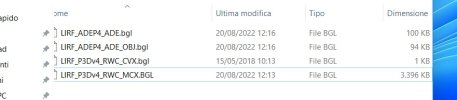
To add: I have followed exactly the procedure I outlined above. I modified the airfield simply by adjusting the runway Land-TO priorities, and saved the resulting .ad4 and compiled the .bgls. This results in an airfield bgl of 112kb, and an OBJ bgl of 94kb, which only includes object placements. I extracted Ray's objects from his airfield file in MCX and saved them as a scenery bgl (3396kb). I included the following four files in the scenery folder: LIRF_ADEP5_TJC.bgl (my modified airfield file), LIRF_ADEP5_TJC_OBJ.bgl (object placement file), LIRF_P3Dv4_Obj_RWC.bgl (the extracted model files) and LIRF_P3Dv4_RWC_CVX.bgl (the airfield background/flatten file). There was no need to re-place the stock airfield buildings. I have not needed to modify any Orbx scenery folders.

Note that, as far as I can tell, Ray has used only objects available within the stock Microsoft FSX scenery libraries (except for the JFK jetways, which he mentions in the ReadMe) and so no Texture folder is needed. I haven't checked each of the 25 models, but I don't think any are his original work - which leads me to idly wonder quite why he constructed it as he did, but it's not important.

The net result of all that is that the airfield displays as intended by Ray, and as I expected. Had I wanted to, I could have introduced more objects of my own which would have also displayed within the scenery.
 

Attachments

  • LIRF P3Dv5 4.jpg
    LIRF P3Dv5 4.jpg
    32.9 KB · Views: 161
  • LIRF P3Dv5 5.jpg
    LIRF P3Dv5 5.jpg
    412 KB · Views: 162
I extracted Ray's objects from his airfield file in MCX and saved them as a scenery bgl (3396kb). I included the following four files in the scenery folder: LIRF_ADEP5_TJC.bgl (my modified airfield file), LIRF_ADEP5_TJC_OBJ.bgl (object placement file), LIRF_P3Dv4_Obj_RWC.bgl (the extracted model files) and LIRF_P3Dv4_RWC_CVX.bgl (the airfield background/flatten file).
How can I do this??
 
Hi Davide:

I shall not attempt to proceed, if any default P3Dv4 or add-on BGLs from the packages you cited above are located within:

[P3Dv4 install path]\Addon Scenery\Scenery

(...and any textures specified by RS or RWC located within [P3Dv4 install path]\Addon Scenery\Texture sub-folder )


I shall only attempt to proceed if:

1.) You create a FTX Central Scenery Library Insertion Point to leave room at the top for your files and add-ons from RS, RWC etc.

2.) Default P3Dv4 BGLs left in the sub-folder chains where they are originally installed by the Lockheed Martin P3D installer

3.) BGLs for any / all packages containing scenery intended for use at LIRF from RS, RWC, and you ...are:

a.) in separate new folder chains with a top folder and a Scenery sub-folder

NOTE: (...and textures located within a \Texture sub-folder only if specified by RS or RWC)


b.) linked to separate new Area layers at / near the top above all OrbX Area layers ...in P3Dv4 Scenery Library GUI stack of layers.


Also, please attach to a reply here, the very latest ADE *.AD4 project file for your intended modifications at LIRF.


Please state which source BGL you used to create your derived ADE *.AD4 project file ex:

* Default Prepar3D v4.x airport BGL (aka "Stock" LIRF):

[Prepar3D_v4 install path]\Scenery\0602\scenery\APX51170.bgl (ADE automatically finds this for you if you Open "Stock" LIRF)

...or:

* Add-on Prepar3D_v4 LIRF by Robert W. Catherall: [LIRF_P3Dv4_RWC]\Scenery\LIRF_P3Dv4_RWC.bgl

...or:

* Add-on FSX LIRF by Ray Smith: [FSX_lirf_rs]\Scenery\LIRF_RS.BGL


GaryGB
I'll tra tomorrow, thanks to everybody for your help
 
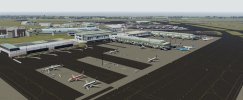
OK, it turned out I already had the FSX version of LIRF by Ray Smith (which I'd updated to P3Dv4 for myself) and I've now downloaded the updated version by Robert Catherall - screenshot attached, along with one of the stock airport..

As Jon carefully explained in post #23, Ray included his very modest number of additional minor scenery items by adding them as models to the .ad4 file, not as .bgls. You can't extract the models from the .ad4 file, and if you attempt to modify the scenery objects in ADE you may well lose the lot - as you've found. The vast majority of the buildings in this scenery are stock Microsoft FSX (possibly even FS9) items, so they are easy to restore by starting from the stock airport in ADE. However, Ray Smith did all the good work by allocating parking spaces and slightly adjusting the airport layout to better represent reality. You could reproduce this, or (for your own use only) you could start from Ray's airfield layout, add the stock buildings as a .bgl (they're in Prepar3DvX\Scenery\EurW\Scenery\Rome.bgl), add Ray's additional scenery items extracted via MCX and exported as a P3Dv4.4 .bgl, and then whatever additional modifications you wish to make. From Gary's screenshots of the difference between the Ray Smith scenery and your modified one, it looks like you're trying to modify the background. I'm not sure what you're trying to achieve exactly, but using the method I've outlined would allow you to change the airport materials and create your own airfield background CVX in whatever style you wish (as catered for by ADE). You could also, of course, create a photoreal background using FS Earth Tiles or SBuilder X to enhance the airfield. This last can be done with no mods to Ray's airfield.
Of course this will be just for my own use, and to update the airport, for example in Fiumicino there is a new terminal three or one (I think one), which is not present in this scenery, so I would like to build it
 
How can I do this??
Well, which part of the process I described are you struggling with? All of it is straightforward.

It should be reiterated that absolutely nothing in this scenery is original to Ray Smith apart from the arrangement of nominated parking, taxiways and extra items. Everything in it is sourced from within FSX. So you’re not trying to extract original work, you are simply rearranging stuff from Microsoft’s libraries. However, just like music, the arrangement we are playing with is someone else’s work so should be respected. Robert Catherall presumably reformatted the files to P3Dv4, which would have been largely unnecessary if Ray hadn’t incorporated the Microsoft scenery models into his scenery (which in itself is a slightly dubious methodology!). Had it simply been done as object placements (which is what my modifications result in) the scenery would have accessed the same resources in P3D, as already converted by Lockheed Martin.

However, the process I described of extracting the models in MCX may be the best way of allowing modifications to this particular scenery even though all the models are already within P3D and should normally be placeable by ADE. In Ray’s version, because he extracted the models from FSX and then incorporated them in his .ad4, they are tagged differently from the default scenery items so his .ad4 won’t call from Microsoft’s (or, in this case, P3D's) libraries - which is why everything disappears when you try to modify it.

It would be a pain to recreate Ray’s work in ADE by rebuilding the airfield from stock, so extracting the models and keeping their object placements (as I did) is the easiest way to allow further revisions. You could then add the new terminal, using assets already within P3D, and make any other mods you need.
 
Last edited:
Well, which part of the process I described are you struggling with? All of it is straightforward.

It should be reiterated that absolutely nothing in this scenery is original to Ray Smith apart from the arrangement of nominated parking, taxiways and extra items. Everything in it is sourced from within FSX. So you’re not trying to extract original work, you are simply rearranging stuff from Microsoft’s libraries. However, just like music, the arrangement we are playing with is someone else’s work so should be respected. Robert Catherall presumably reformatted the files to P3Dv4, which would have been largely unnecessary if Ray hadn’t incorporated the Microsoft scenery models into his scenery (which in itself is a slightly dubious methodology!). Had it simply been done as object placements (which is what my modifications result in) the scenery would have accessed the same resources in P3D, as already converted by Lockheed Martin.

However, the process I described of extracting the models in MCX may be the best way of allowing modifications to this particular scenery even though all the models are already within P3D and should normally be placeable by ADE. In Ray’s version, because he extracted the models from FSX and then incorporated them in his .ad4, they are tagged differently from the default scenery items so his .ad4 won’t call from Microsoft’s (or, in this case, P3D's) libraries - which is why everything disappears when you try to modify it.

It would be a pain to recreate Ray’s work in ADE by rebuilding the airfield from stock, so extracting the models and keeping their object placements (as I did) is the easiest way to allow further revisions. You could then add the new terminal, using assets already within P3D, and make any other mods you need.
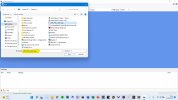
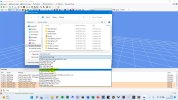
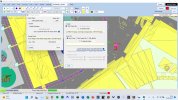
is this procedure right? as you can see in the screens this is what I have understood
 

Attachments

  • 1.jpg
    1.jpg
    220.2 KB · Views: 167
  • 2.jpg
    2.jpg
    354.6 KB · Views: 166
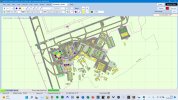
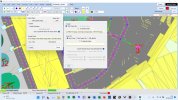
then in ade 1.78 I have
1) opened the airport (LIRF_P3Dv4_RWC.bgl)
2) modified the jetway position
3)compiled with the check box checked (compile separate airport and object bgl files).
is this right??
 

Attachments

  • 1.jpg
    1.jpg
    370.3 KB · Views: 169
  • 2.jpg
    2.jpg
    370.5 KB · Views: 157
  • 3.jpg
    3.jpg
    367.5 KB · Views: 172
Hi Davide. Yes, that all looks great. Combine your new airfield and OBJ files with the converted buildings bgl and the existing CVX files in a scenery folder that replaces the RWC version (as I showed in my file screenshot above) and you should be good to go!
 
Just make sure you remove the old version of the airfield before you launch the sim. I never delete old versions; I simply store them in archives that the sim can’t read just in case I need access to them again.
 
how to delete the old jetways?
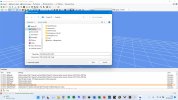
the first is the modified airport
the second are the object
the third is the cvx
and the last one is the original lirf rs converted in mcx
 

Attachments

  • remaning jetways.jpg
    remaning jetways.jpg
    427.2 KB · Views: 158
  • files.jpg
    files.jpg
    25.3 KB · Views: 151
Ok, I’m not sure what you’ve done here. Have you deleted (or at least disabled) all other instances of the airport? It looks like the default LIRF is still being seen by the sim.
 
This is not the original (stock) lirf but the third party addon.
It seems like that the sim still read the lirf rs wich is the one that I have exported in MCX
 
LIRF_P3Dv4_obj_RWC.BGL this is the file processed in MCX
LIRF_P3Dv4_RWC.BGL modified airport
LIRF_P3Dv4_RWC_CVX.BGL flatten file
LIRF_P3Dv4_RWC_OBJ.BGL object file processed from ADE
but the result is this one
 

Attachments

  • 1.jpg
    1.jpg
    23.8 KB · Views: 163
  • remaning jetways.jpg
    remaning jetways.jpg
    427.2 KB · Views: 155
The extra jetways are only on the default FSX scenery, which must be being seen by the sim somewhere. Those jetways do not exist in the Ray Smith/RWC scenery. So either you have somehow combined the default and modified AFDs (in which case you will be able to delete the jetways in ADE) or the sim can still see another copy of LIRF. I understand you use Addon Airfields for your third-party sceneries rather than XML, so do a search for any other instances of LIRF. If you use Orbx, make sure that there are no entries for LIRF active in the Orbx directory. Indeed, search your entire computer for LIRF and make sure that you establish what every example listed is and does. Remove anything that isn't needed by the sim.

Incidentally, I assume you renamed your modified airport file to match the RWC title. I would advise against that, as the potential exists to overwrite the original wherever it is stored, and that may prevent you re-accessing the original if you need to. Allow ADE to save it in your own name (as you can see I did in my file list above) so that it is easy to identify what you have modified, and there is no risk of your modifications 'escaping' into the flight sim community under the original identity.

Just to confirm, those jetways definitely do not appear on that terminal in my installation:
 

Attachments

  • Screenshot 2022-08-17 134335.jpg
    Screenshot 2022-08-17 134335.jpg
    629.2 KB · Views: 157
Last edited:
The extra jetways are only on the default FSX scenery, which must be being seen by the sim somewhere. Those jetways do not exist in the Ray Smith/RWC scenery. So either you have somehow combined the default and modified AFDs (in which case you will be able to delete the jetways in ADE) or the sim can still see another copy of LIRF. I understand you use Addon Airfields for your third-party sceneries rather than XML, so do a search for any other instances of LIRF. If you use Orbx, make sure that there are no entries for LIRF active in the Orbx directory. Indeed, search your entire computer for LIRF and make sure that you establish what every example listed is and does. Remove anything that isn't needed by the sim.

Incidentally, I assume you renamed your modified airport file to match the RWC title. I would advise against that, as the potential exists to overwrite the original wherever it is stored, and that may prevent you re-accessing the original if you need to. Allow ADE to save it in your own name (as you can see I did in my file list above) so that it is easy to identify what you have modified, and there is no risk of your modifications 'escaping' into the flight sim community under the original identity.

Just to confirm, those jetways definitely do not appear on that terminal in my installation:
in my case, I have modified the jetway and the parking positions and saved it, but it seems that the sim still load the "old" scenario "RWC" on my new modified scenario
 
It can only load it if it can see it. Either you have a copy of the original RWC file in your Addon Scenery or it's in the xml list of addon airfields - but the original file is on your system somewhere. It's possible that somehow you have combined the original and modified airfields in a single bgl, but that is easy to establish in ADE. Load your ad4 and delete one of your modified parking spots. If there's another one underneath it, you've combined them - a parking spot cannot generate two jetways, so for the sim to show two jetways needs it to see two parking spots in the same place. Another way to see what's going on is to load the list of parking spots in ADE, though it's not as obvious as deleting one to see what's underneath it! If you'd like me to check, send me your ad4 file by PM.
 
my course of action.
1) download the scenery
2)convert the original file downloaded from avsim
3) modify the airport in ADE
4) compile the airport
5) my files in the addon scenery folder
6) add my scenery inn the scenery list in p3d
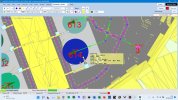
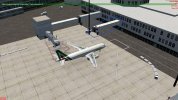
7) the result is this (the jetway from the original scenario "the one downloaded from avsim")
now I want to know why I still seeing the jetway in the image 7 even if I have deleted the airport I downloaded.
tell me if the message is clear and if you have undestood
 

Attachments

  • 1.jpg
    1.jpg
    325.3 KB · Views: 167
  • 2.jpg
    2.jpg
    314.4 KB · Views: 148
  • 3.jpg
    3.jpg
    351.1 KB · Views: 141
  • 4.jpg
    4.jpg
    351.7 KB · Views: 162
  • 5.jpg
    5.jpg
    34.2 KB · Views: 156
  • 6.jpg
    6.jpg
    26.4 KB · Views: 156
  • 7.jpg
    7.jpg
    474.3 KB · Views: 175
Yes, fully understood.

Ah!

The last screenshot gives us a small clue. The jetway you’ve circled is not a default (ie Microsoft FSX) jetway. The other one is a default jetway. I don’t recognise the circled one, but it must come from somewhere. Is it perhaps from an FS9 version of the airport? As far as I remember, FS9 didn’t have animated jetways as standard, though there was third-party scenery with animated jetways.

Does that jetway move, or is it static? Have you ever had an FS9 LIRF?

Note that the jetways in my screenshots are different as they are from the GSX Level 2 add-on.

Edit: a thought. Ray in his Readme asks you to install a copy of the JFK jetway textures in the master Textures folder. Did you by any chance add the JFK jetway Scenery folder to the master Scenery folder at the same time? I have no idea if that would produce this result, but it would be good to eliminate this as a possibility.
 
Last edited:
Back
Top