• Which the release of FS2020 we see an explosition of activity on the forun and of course we are very happy to see this. But having all questions about FS2020 in one forum becomes a bit messy. So therefore we would like to ask you all to use the following guidelines when posting your questions:

    • Tag FS2020 specific questions with the MSFS2020 tag.
    • Questions about making 3D assets can be posted in the 3D asset design forum. Either post them in the subforum of the modelling tool you use or in the general forum if they are general.
    • Questions about aircraft design can be posted in the Aircraft design forum
    • Questions about airport design can be posted in the FS2020 airport design forum. Once airport development tools have been updated for FS2020 you can post tool speciifc questions in the subforums of those tools as well of course.
    • Questions about terrain design can be posted in the FS2020 terrain design forum.
    • Questions about SimConnect can be posted in the SimConnect forum.

    Any other question that is not specific to an aspect of development or tool can be posted in the General chat forum.

    By following these guidelines we make sure that the forums remain easy to read for everybody and also that the right people can find your post to answer it.

MSFS20 Weird Texture in Glass

Messages
19
Country
germany
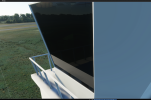
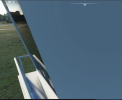
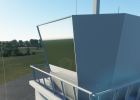
Hello everyone, I've been trying to get full reflections from all angles on my windows.
I've tried msfs_glass and msfs_standard, set the roughness to 0, metallic to 100, played around with the reflections parameters, but reflections can only be seen from a very sharp angle.

Is there a way to fix this?
 

Attachments

  • reflections1.PNG
    reflections1.PNG
    1.5 MB · Views: 334
  • reflections2.PNG
    reflections2.PNG
    1 MB · Views: 314
  • reflective1.PNG
    reflective1.PNG
    1 MB · Views: 386
  • reflective2.PNG
    reflective2.PNG
    616.8 KB · Views: 352
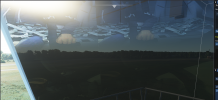
Another problem I came up with, was that there is a werid texture in my window.
 

Attachments

  • reflections3.PNG
    reflections3.PNG
    1.5 MB · Views: 445
I remember FSX doing this when it was running low on RAM. It would use a FSX label texture. If you started seeing FSX on things, you knew your memory was past redline and it was using some base texture. But thats FSX.

This is a background forward plexi 'photo' for reflection, showing the two pilots. I am thinking for instruments. Did you recycle this from a gauge glass?
 
I remember FSX doing this when it was running low on RAM. It would use a FSX label texture. If you started seeing FSX on things, you knew your memory was past redline and it was using some base texture. But thats FSX.

This is a background forward plexi 'photo' for reflection, showing the two pilots. I am thinking for instruments. Did you recycle this from a gauge glass?
Hey, can you maybe specify what you mean by recicle this from a gauge glass? I am new to blender and I'm just using the msfs toolkit
 
The reflection is just how the MSFS glass material works. As 614NVL said, reduce the reflection mask factor to get rid of it.
 
Is there a way to get full reflections like on a mirror? The Glass Material only shows reflections from a specific angle.
 
With msfs_Glass I also always have the reflection on the glass of the interior of your model vehicle in which you play.
How to get the reflection of the environment ?
If you reduce the reflection mask you lose all reflections.
After about forty tests with msfs-standard and msfs-glass the result is still the same this interior cockpit texture appears ...
Only opaque glass can display true reflections, so how the hell do Asobo manage to display glass that is both transparent and with a reflection of the natural environment ? and not a cubemap
 
Last edited:
Back
Top