
• Which the release of FS2020 we see an explosition of activity on the forun and of course we are very happy to see this. But having all questions about FS2020 in one forum becomes a bit messy. So therefore we would like to ask you all to use the following guidelines when posting your questions:

    • Tag FS2020 specific questions with the MSFS2020 tag.
    • Questions about making 3D assets can be posted in the 3D asset design forum. Either post them in the subforum of the modelling tool you use or in the general forum if they are general.
    • Questions about aircraft design can be posted in the Aircraft design forum
    • Questions about airport design can be posted in the FS2020 airport design forum. Once airport development tools have been updated for FS2020 you can post tool speciifc questions in the subforums of those tools as well of course.
    • Questions about terrain design can be posted in the FS2020 terrain design forum.
    • Questions about SimConnect can be posted in the SimConnect forum.

    Any other question that is not specific to an aspect of development or tool can be posted in the General chat forum.

    By following these guidelines we make sure that the forums remain easy to read for everybody and also that the right people can find your post to answer it.

[SKP/MCX] Stubborn model texture mapping issue.

Rotornut44

Resource contributor
Messages
671
Country
us-florida
Hello.
I'm throwing this thread into the 3D Objects General forum board because quite frankly I'm not sure exactly where it fits..

I've had this issue for a while and have ignored it until now since it has just been a minor texture issue. However, I would like to fix it. When viewing my model inside of Sketchup, you can see that the braces between the dock poles seem to be textured correctly. However if you export this model as a DAE file and import it into Model Converter X, you will notice that the wrong textures now show on these braces. The plain wood is now replaced with another variation that I have applied some AO to. On the texture sheet, these are stacked on top of each other.

Any idea what would cause this?

(Model as seen in Sketchup.)
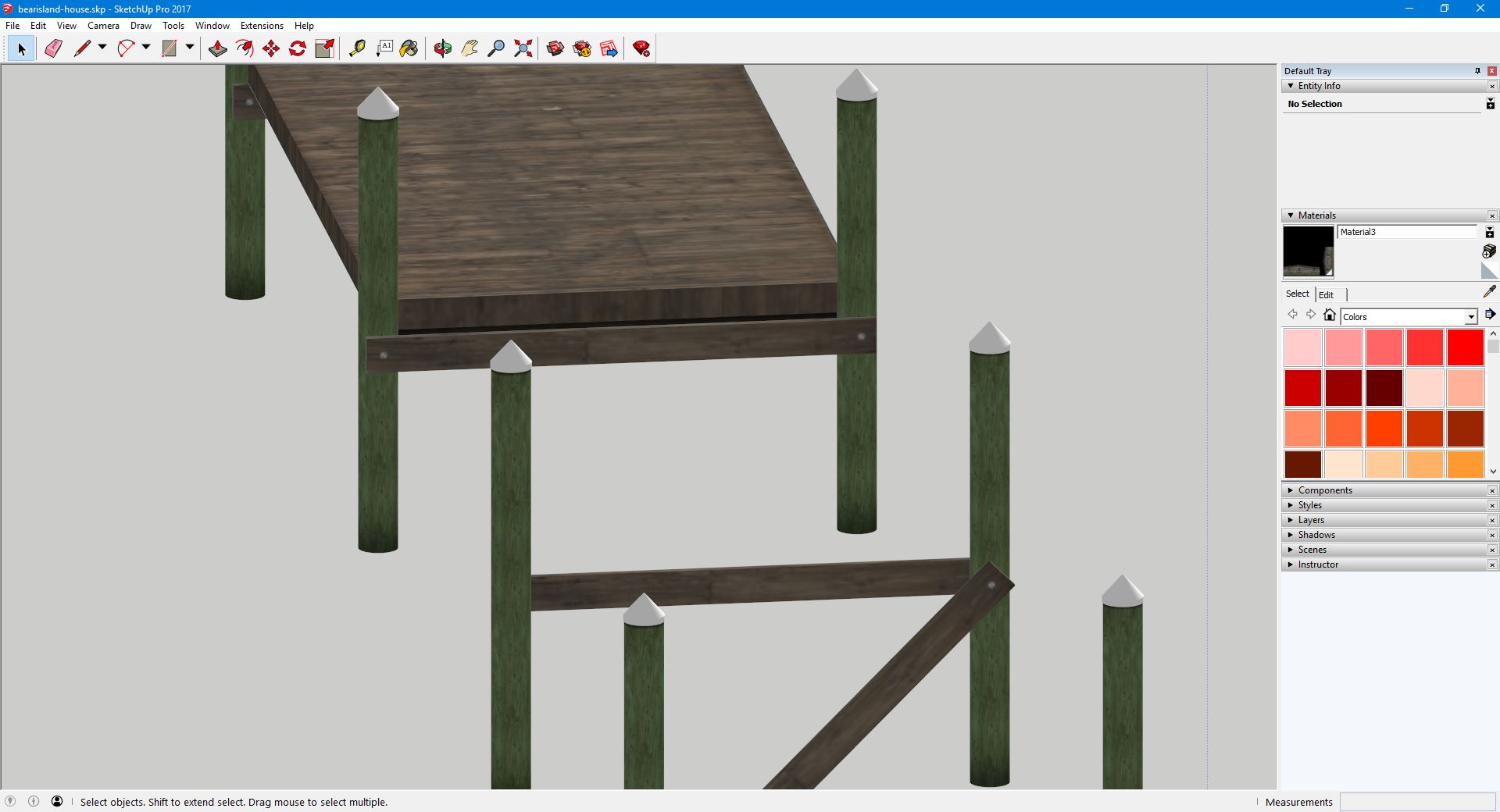
bi_dock_skp.JPG


(Model as seen in Model Converter X.)
bi_dock_mcx.JPG


(Snippet of Texture Sheet centered on Wood Brace textures.)
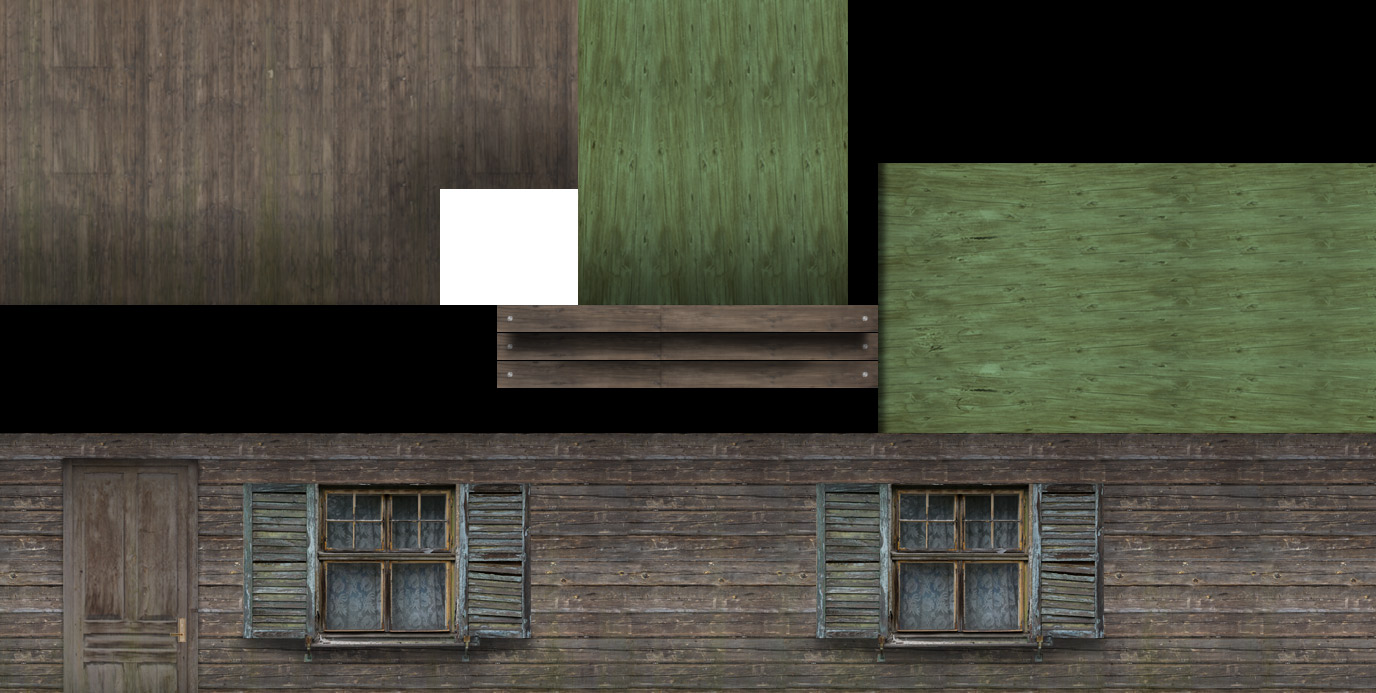
bi_t.jpg
 
The simple answer is "never move the yellow pin." Sketchup maps polygons to a texture, each polygon supports only one mapping scheme. Distorting the texture may make it line up advantageously somewhere, but it will "twist" the texture beyond what is capable to orient with normal xyz mapping. Now you have two polygons (or more) that call the same texture, but they do not want the same texture. In this case, Sketchup will make a new warped texture, if you allow it and if you do not, one of your groups of polygons will not be mapped properly.
An easy way to deal with this is to set your projected texture on a plane and leave it there. Rotate your model instead, map a projection and rotate the model back to "neutral." If you have a tire, or a dock brace to map, convert it into a component, clone it and place your copy in relation to the texture sheet. Expand it, turn it, orient it and finally "photograph" your projection, that angled capture will be reflected on every member of that component set.

Looking carefully, I see only a slight discrepancy and indeed, the MCX render appears to be the desired result. Of the braces portion of your texture sheet, I see two that appear to be shaded for shadow. In the MCX capture I see the darker one as a back side between pilings and I see the lighter one at the end of the dock, both where I might expect them and neither visible in the Sketchup capture. In the Sketchup capture, all braces appear to be textured from the top third of the braces section of your texture sheet (which imo would be entirely adequate for this model). If this is true and is the issue, the problem is not the yellow pin, the problem would be sequestering and organizing successive builds.
 
The simple answer is "never move the yellow pin." Sketchup maps polygons to a texture, each polygon supports only one mapping scheme. Distorting the texture may make it line up advantageously somewhere, but it will "twist" the texture beyond what is capable to orient with normal xyz mapping. Now you have two polygons (or more) that call the same texture, but they do not want the same texture. In this case, Sketchup will make a new warped texture, if you allow it and if you do not, one of your groups of polygons will not be mapped properly.
An easy way to deal with this is to set your projected texture on a plane and leave it there. Rotate your model instead, map a projection and rotate the model back to "neutral." If you have a tire, or a dock brace to map, convert it into a component, clone it and place your copy in relation to the texture sheet. Expand it, turn it, orient it and finally "photograph" your projection, that angled capture will be reflected on every member of that component set.

Looking carefully, I see only a slight discrepancy and indeed, the MCX render appears to be the desired result. Of the braces portion of your texture sheet, I see two that appear to be shaded for shadow. In the MCX capture I see the darker one as a back side between pilings and I see the lighter one at the end of the dock, both where I might expect them and neither visible in the Sketchup capture. In the Sketchup capture, all braces appear to be textured from the top third of the braces section of your texture sheet (which imo would be entirely adequate for this model). If this is true and is the issue, the problem is not the yellow pin, the problem would be sequestering and organizing successive builds.

It definitely wouldn't have anything to do with the yellow pin. I never use that. Have always just used the scale pin. (Whatever color that one is) The only texture I have projected would be the actual dock poles.
What is this "sequestering and organizing successive builds" that you speak of?
 
Well, it really boils down to the fasteners, imo. You see the gray circles, that represent spikes or carriage bolts or whatever; well unless they are separately mapped, to their own distinct polygons, it couldn't really be a scaling issue anyway, correct? Because you could only get those circles at the ends of the boards unless you specifically put them there. The same holds true for the section of the texture sheet where it looks like those boards are shadowed, or at least darkened. You can see that in the Sketchup picture, the lighter shadow one is at the end of the dock, where you might expect it and the darker one is facing the inside of a space formed by it and the two pilings, exactly where one might expect a more shadowed board face to be. It does not represent what is currently in the Sketchup window, but it very much looks like it was made this way intentionally at some point and the implication is that, possibly, it is the version you open in MCX and for whatever reason, not the latest build shown in the SU workspace. That is what I mean by sequestering and organizing successive builds. I would not mention the possibility at all, but it has also happened to me. One example is when I first open Sketchup and then go to save, the default save path is not the path I used last session, as with most softwares, the default save path is User\Documents and if I don't catch that, then the version I open in MCX ends up being the last save from the previous work session - oops.
I can't think of anything else that would have the fasteners line up exactly where they are supposed to be...try saving to a fresh directory.
 
Back
Top